

The MSI X570 Gaming Plus launched back in 2019 alongside AMD’s Ryzen 3000 series, and it’s still kicking around gaming builds in 2026. That’s saying something for a board that originally retailed as a mid-range option in the X570 lineup. With PCIe 4.0 support (before it became standard), robust VRM design, and compatibility with everything from third-gen Ryzen chips up through the 5000 series, this board punched above its weight class for years.
But here’s the thing: motherboards age differently than GPUs or CPUs. While newer chipsets like X670 and B650 have hit the market with DDR5 and PCIe 5.0, the X570 Gaming Plus still holds relevance for builders on AM4 platforms or anyone snagging a deal on used components. Whether you’re dropping in a Ryzen 5 5600X or pushing a 5950X to its limits, understanding what this board delivers, and where it falls short, matters if you’re building or upgrading in 2026.
This review breaks down the X570 Gaming Plus from every angle: specs, thermals, gaming performance, BIOS experience, and how it stacks up against both its X570 siblings and modern alternatives. Let’s see if this board still deserves a spot in your rig.
Key Takeaways
- The MSI X570 Gaming Plus remains a solid choice in 2026 for AM4 platform builders upgrading within the ecosystem or reusing DDR4 components at clearance pricing ($120–140).
- PCIe 4.0 support and dual M.2 slots make the X570 Gaming Plus ideal for fast NVMe storage, delivering noticeable load time improvements in modern games.
- The board’s 10+2 VRM design handles Ryzen 5000 CPUs up to the 5950X at stock or moderate overclocking without throttling, though extreme overclocks push thermal limits.
- The audible chipset fan is the X570 Gaming Plus’s biggest quirk—a high-pitched whir under load that some users find irritating, though adjustable via BIOS.
- Starting from scratch? AM5 boards (B650/X670) and B550 alternatives offer better value, DDR5 upgrade paths, and superior thermals compared to aging X570 hardware.
- A Ryzen 5800X3D paired with the X570 Gaming Plus creates a high-performance AM4 gaming build that won’t bottleneck—proving the board still punches above its weight class for gaming in 2026.
What Is the MSI X570 Gaming Plus Motherboard?
The MSI X570 Gaming Plus is an ATX motherboard built on AMD’s X570 chipset, designed to support AM4 processors from Ryzen 2000 series through Ryzen 5000 series (with BIOS updates). It was positioned as a budget-friendly entry point into the X570 ecosystem, offering PCIe 4.0 lanes and robust power delivery without the premium price tag of high-end boards.
This board launched when PCIe 4.0 was cutting-edge tech, and while that’s table stakes now, it still matters for NVMe drives and GPU bandwidth. MSI targeted builders who wanted X570 features, better VRMs than most B450 boards, full chipset lane availability, without dropping $300+ on enthusiast-tier options.
Key Specifications and Technical Overview
Here’s what you’re working with on the X570 Gaming Plus:
- Chipset: AMD X570
- Socket: AM4 (supports Ryzen 2000, 3000, 4000G, 5000 series with BIOS update)
- Form Factor: ATX (305mm x 244mm)
- Memory Support: 4 x DIMM slots, DDR4 up to 4400MHz (OC), max 128GB
- VRM Configuration: 10+2 phase power design (doubled 5+2)
- PCIe Slots: 1 x PCIe 4.0 x16, 1 x PCIe 4.0 x16 (x4 mode), 2 x PCIe 4.0 x1
- Storage: 2 x M.2 slots (both PCIe 4.0 x4), 6 x SATA 6Gb/s
- Rear I/O: 1 x USB 3.2 Gen2 Type-A, 1 x USB 3.2 Gen2 Type-C, 4 x USB 3.2 Gen1, 2 x USB 2.0, HDMI, DisplayPort (for APUs), Realtek ALC1200 audio, Realtek RTL8111H Gigabit LAN
- Chipset Cooling: Active cooling (small fan on chipset)
The VRM setup is solid for the price bracket. Ten phases for Vcore means you can comfortably run a Ryzen 9 5900X or 5950X without throttling, though heavy overclocking pushes it harder than pricier boards.
One quirk: the X570 chipset requires active cooling due to higher power draw from those PCIe 4.0 lanes. MSI stuck a small fan on the chipset heatsink, and it’s been a point of debate since launch, more on that in thermal management.
Who Should Consider This Motherboard?
In 2026, the X570 Gaming Plus makes sense for specific use cases:
AM4 platform builders. If you’re sticking with or upgrading within the AM4 ecosystem, maybe you scored a 5800X3D at a good price, this board supports it after a BIOS update. It’s a cost-effective pairing with mid-to-high-end Ryzen 5000 chips.
Budget-conscious builders reusing components. Got DDR4 RAM you want to keep using? The X570 Gaming Plus lets you avoid the DDR5 premium while still getting PCIe 4.0 for your GPU and storage.
Users who need multiple NVMe drives. Both M.2 slots run at PCIe 4.0 x4, which matters if you’re loading games off fast storage or working with large files. Some B450 boards only gave you one Gen4 slot.
Not ideal for: Builders starting fresh in 2026 should probably look at AM5 boards (B650/X670) for DDR5 support and upgrade paths. You’re also out of luck if you hate the idea of a chipset fan humming in your case.
The board launched around $169-$189 MSRP but can often be found for $120-$140 used or on clearance in 2026, which shifts its value proposition significantly.
Design and Build Quality
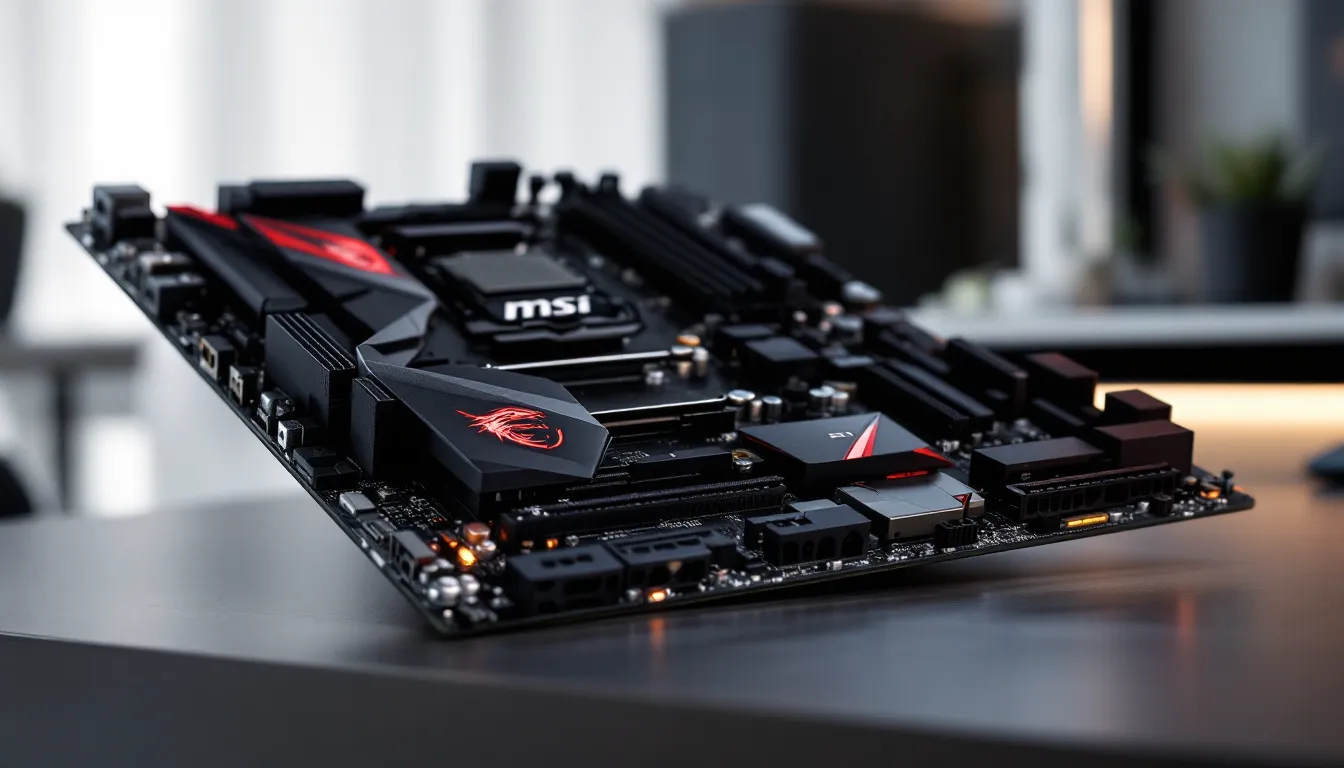
The X570 Gaming Plus sports MSI’s mid-2019 aesthetic: black PCB, gray heatsinks with red accents, and just enough RGB to tick the box without going overboard. It’s not trying to compete with ASUS ROG boards on looks, but it’s clean enough for most builds.
Build quality is typical MSI, solid PCB, no flex issues, reinforced PCIe slots to prevent GPU sag damage. The heatsinks feel substantial, though they’re not as beefy as what you’d find on X570 Tomahawk or Unify models.
Aesthetic Features and RGB Lighting
RGB on this board is minimal:
- Onboard RGB: Single RGB LED zone on the chipset heatsink (MSI Dragon logo)
- RGB Headers: 2 x Rainbow RGB headers (5050 strips), 2 x Corsair-compatible RGB headers (WS2812B addressable)
You can control lighting through MSI Mystic Light, which syncs with compatible RAM, fans, and peripherals. It’s functional but not as polished as ASUS Aura or Gigabyte RGB Fusion 2.0. Mystic Light occasionally bugs out after Windows updates, requiring reinstalls, annoying but fixable.
The gray-and-red color scheme looks dated in 2026 compared to all-black or white builds that dominate the meta. If aesthetics are priority one, you might want a board with better color coordination.
Cooling Solutions and Thermal Management
The VRM heatsinks do their job. Under sustained load with a Ryzen 9 5900X (stock settings), VRM temps hover around 65-70°C with decent case airflow. Push an all-core overclock to 4.5GHz and you’ll see 75-80°C, which is acceptable but not stellar.
No VRM heatpipe connects the heatsinks, so you’re relying on passive cooling and ambient airflow. In a case with good ventilation, it’s fine. In a compact or restrictive chassis, consider adding a small fan aimed at the VRM area.
The chipset fan is the elephant in the room. It’s a 40mm fan that spins up under load to keep the X570 chipset cool. At idle or light gaming, it’s often silent or barely audible. Fire up a game that hammers the GPU and saturates PCIe lanes, and it becomes noticeable, not jet-engine loud, but a high-pitched whir that some users find irritating.
MSI lets you adjust the chipset fan curve in BIOS, but turning it too passive risks thermal throttling if you’re running multiple PCIe 4.0 devices. Some builders replace the stock fan with a quieter Noctua 40mm model, which helps but voids warranty technically.
The M.2 heatsinks are basic aluminum covers. They keep drives from throttling under sustained writes, but don’t expect cutting-edge thermal solutions like you’d get on higher-end boards with multi-layer heatsinks or thermal pads.
Gaming Performance Analysis
Motherboards don’t directly boost FPS, but they enable or bottleneck your components. The X570 Gaming Plus holds its own in gaming scenarios, especially when paired with appropriate CPUs and GPUs.
CPU Compatibility and Overclocking Potential
The board officially supports:
- Ryzen 2000 series (Pinnacle Ridge)
- Ryzen 3000 series (Matisse)
- Ryzen 4000G series (Renoir APUs)
- Ryzen 5000 series (Vermeer, requires BIOS 7C37v17 or later)
Ryzen 5000 series chips are the sweet spot for this board in 2026. A Ryzen 5 5600X pairs beautifully, the VRM handles it without breaking a sweat, and you get solid 1080p/1440p gaming performance. Step up to a Ryzen 7 5800X3D, and you’ve got one of the best gaming CPUs of the AM4 era, with the board’s PCIe 4.0 lanes feeding data fast enough to avoid bottlenecks.
Overclocking on the X570 Gaming Plus is possible but not its strength. The 10+2 VRM config can handle moderate overclocks on chips like the 5800X (4.6-4.7GHz all-core), but you’ll see higher VRM temps than premium boards. Push a 5950X hard, and you’re flirting with thermal limits unless you’ve got excellent case airflow.
PBO (Precision Boost Overdrive) and curve optimizer tweaks work great here, better than manual overclocking, honestly. Let the chip boost intelligently, and the board keeps up without issue.
RAM Performance and Memory Support
DDR4 support tops out at 4400MHz (OC), though realistically you’ll run 3200MHz-3600MHz kits for best price-to-performance. Ryzen 5000 chips love 3600MHz CL16 or 3200MHz CL14 RAM, and the X570 Gaming Plus handles those speeds without drama.
The board uses a daisy-chain memory topology, which means:
- Two DIMMs (one per channel): Easier to hit higher speeds (3600MHz+)
- Four DIMMs (all slots populated): Harder to stabilize beyond 3200MHz, especially with 32GB sticks
If you’re running 32GB total (2 x 16GB), you’ll hit rated speeds no problem. Go for 64GB or 128GB (4 DIMMs), and you might need to relax timings or lower frequency slightly.
In gaming, RAM performance above 3600MHz shows diminishing returns on Ryzen 5000. The X570 Gaming Plus gets you into the optimal range without fuss, which is what matters.
PCIe 4.0 and GPU Performance Benefits
The primary PCIe x16 slot runs at PCIe 4.0 x16, fed directly from the CPU. This matters less for GPUs in 2026 than it did in 2019, most cards don’t saturate even PCIe 3.0 x16 bandwidth at 1080p or 1440p. Testing from Tom’s Hardware shows that even high-end GPUs like the RTX 4080 see minimal gains from PCIe 4.0 versus 3.0 in most titles.
That said, the bandwidth headroom future-proofs the board slightly. If you upgrade to a next-gen GPU that does leverage Gen4, you’re covered.
The second PCIe x16 slot runs at x4 mode, electrically. It’s fine for capture cards or lower-end secondary GPUs, but don’t expect to run dual high-end GPUs for SLI/CrossFire (both techs are dead anyway).
For storage, PCIe 4.0 on both M.2 slots is where the value lives. Load times in games like Cyberpunk 2077 or Starfield improve noticeably with Gen4 NVMe drives pulling 5000+ MB/s reads.
Storage and Connectivity Options
Storage flexibility is a strength of the X570 Gaming Plus, especially at its price point.
M.2 Slots and NVMe Support
You get 2 x M.2 slots, both supporting:
- PCIe 4.0 x4 (up to 7000 MB/s theoretical, though drives max around 5000-7000 MB/s in practice)
- SATA M.2 drives (if you have older M.2 SATA SSDs lying around)
M.2_1 sits above the primary PCIe x16 slot, covered by a heatsink. M.2_2 is located below the second PCIe x16 slot, also with a heatsink.
Both slots pull lanes from the chipset, not the CPU, which means they share bandwidth with other peripherals. Under heavy multi-device load (GPU, two NVMe drives, SATA drives, USB devices all active), you can see slight bottlenecks, but it’s rare in typical gaming scenarios.
For a gaming rig, the common setup is:
- M.2_1: 500GB-1TB Gen4 NVMe for OS and primary games (Samsung 980 Pro, WD Black SN850)
- M.2_2: 1-2TB Gen4 or Gen3 NVMe for secondary storage
You also get 6 x SATA 6Gb/s ports, which is plenty for HDDs or SATA SSDs. Note that using M.2_2 in SATA mode disables one SATA port (usually SATA_5 or SATA_6, check the manual).
USB Ports, Networking, and Audio Quality
Rear I/O includes:
- 1 x USB 3.2 Gen2 Type-A (10Gbps)
- 1 x USB 3.2 Gen2 Type-C (10Gbps)
- 4 x USB 3.2 Gen1 Type-A (5Gbps)
- 2 x USB 2.0 (for peripherals like keyboards/mice that don’t need bandwidth)
Front panel headers give you 1 x USB 3.2 Gen1 and 2 x USB 2.0 headers.
USB layout is adequate but not generous. If you run a lot of peripherals (mouse, keyboard, headset dongle, webcam, external drive, VR headset), you’ll fill ports fast. A powered USB hub solves this but adds clutter.
Networking: The Realtek RTL8111H Gigabit LAN chip is standard budget fare. It works fine for gaming, latency is stable, no packet loss under load. If you need 2.5GbE or higher, you’ll want a PCIe network card or a pricier motherboard. There’s no onboard Wi-Fi, so plan for Ethernet or a Wi-Fi card.
Audio: The Realtek ALC1200 codec is a step above bargain-basement ALC892 chips. It delivers clean audio for gaming headsets and powered speakers. Audiophiles will still prefer a dedicated DAC/AMP setup, but for most gamers, the onboard audio is perfectly usable. Background noise is minimal, and the audio capacitors are separated from other PCB traces to reduce interference.
No optical S/PDIF output, which might matter if you’re running older home theater setups.
BIOS and Software Experience
MSI’s UEFI BIOS has improved over the years, and the X570 Gaming Plus benefits from those updates. The software suite is hit-or-miss, though.
Navigating the UEFI Interface
The BIOS defaults to EZ Mode, which shows temps, voltages, fan speeds, and basic settings in a visual layout. It’s good for quick fan curve adjustments or checking system status.
Hit F7 to jump into Advanced Mode, where the real tuning lives:
- OC tab: CPU ratio, voltage, BCLK adjustments, PBO settings
- Memory: XMP profiles, manual timing adjustments, DRAM voltage
- Fan Control: Customizable curves for CPU, system, and chipset fans
- Boot settings: Drive priority, fast boot toggles
The interface is responsive and logically organized. Overclocking options are clearly labeled, and MSI includes helpful tooltips for most settings.
One annoyance: BIOS updates reset all settings to default, so save your profiles before flashing. The board supports BIOS Flashback, which lets you update via USB without a CPU installed, handy if you’re pairing an older board with a newer Ryzen 5000 chip that needs a BIOS update first.
Stability has been solid since BIOS version 7C37v17 (the update that added Ryzen 5000 support). Earlier versions had sporadic RAM training issues, but those are mostly ironed out by 2026.
MSI Software Suite and Utilities
MSI bundles several utilities with the board, accessible via MSI Dragon Center or individual installs:
- MSI Mystic Light: RGB control (buggy, as mentioned earlier)
- MSI Command Center: Windows-based overclocking and monitoring (less stable than BIOS tweaks, skip it)
- MSI Live Update: Automatic driver and BIOS updates (convenient but sometimes installs bloatware)
- MSI Game Boost: One-click CPU overclocking presets (not recommended, manual tuning or PBO is better)
Honestly, you can skip most of the software suite. Use the BIOS for overclocking, grab drivers from AMD’s site or MSI’s support page manually, and control RGB with Mystic Light if you need it. Dragon Center tries to do too much and ends up being a resource hog.
For monitoring, HWiNFO64 or Ryzen Master are better tools than MSI’s offerings.
X570 Gaming Plus vs. Competing Motherboards
How does the X570 Gaming Plus stack up in 2026, both against its X570 siblings and newer alternatives?
How It Stacks Up Against Other X570 Boards
Within the X570 family, the Gaming Plus sits in the budget-to-midrange tier. Here’s how it compares:
MSI X570 Gaming Plus vs. MSI X570 Tomahawk WiFi:
- Tomahawk advantages: Better VRM (12+2 phase), Wi-Fi 6, improved heatsinks, cleaner aesthetic
- Gaming Plus advantages: Cheaper (often $40-60 less)
- Verdict: If you can find the Tomahawk for under $180, it’s worth the upgrade. Otherwise, the Gaming Plus is fine for non-extreme builds.
MSI X570 Gaming Plus vs. ASUS TUF Gaming X570-Plus (Wi-Fi):
- ASUS advantages: Wi-Fi 6, better audio (SupremeFX), more robust BIOS, stronger VRM cooling
- MSI advantages: Often cheaper, simpler BIOS for beginners
- Verdict: ASUS TUF boards have better long-term support and build quality, but the MSI undercuts on price.
MSI X570 Gaming Plus vs. Gigabyte X570 Aorus Elite:
- Aorus advantages: 12+2 VRM, better I/O (more USB ports), improved chipset cooling
- MSI advantages: Cleaner BIOS layout
- Verdict: The Aorus Elite is a better board if prices are within $20 of each other.
Testing from Hardware Times consistently shows that VRM quality and cooling separate budget X570 boards from premium ones, and the Gaming Plus lands in the “good enough for most” category.
Value Proposition and Price-to-Performance
In 2026, the X570 Gaming Plus’s value depends heavily on pricing:
At $120-140 (used/clearance): Solid deal for AM4 builds, especially if you already own DDR4 RAM and want PCIe 4.0 without upgrading to AM5.
At $150-180 (new/retail): Questionable. For $150, you can find B550 boards that offer 90% of the features with better thermals and no chipset fan. For $180-200, B650 boards (AM5 platform) start appearing, giving you DDR5 support and an upgrade path to future Ryzen CPUs.
Best use case in 2026: Pairing with a discounted Ryzen 5800X3D or 5900X for a high-performance AM4 build that’ll last another 2-3 years. You’re not chasing the newest platform but maximizing value from mature hardware.
If you’re building from scratch and have no existing AM4 components, spending a bit more on an AM5 board makes more sense long-term. But for upgrades or budget builds reusing parts, the X570 Gaming Plus still delivers.
Building Your Gaming PC with the X570 Gaming Plus
Putting together a rig around the X570 Gaming Plus is straightforward, but a few pairing choices and install tips will save you headaches.
Recommended Component Pairings
Here are some proven combos that balance performance and budget:
Mid-Range Gaming Build (~$800-1200 total):
- CPU: Ryzen 5 5600X or 5600 (6-core, excellent 1080p/1440p gaming)
- GPU: RTX 4060 Ti / RX 7600 XT (1080p high-refresh or 1440p gaming)
- RAM: 16GB (2x8GB) DDR4-3600 CL16 (G.Skill Ripjaws V, Corsair Vengeance LPX)
- Storage: 1TB PCIe 4.0 NVMe (WD Black SN850X, Samsung 980 Pro)
- PSU: 650W 80+ Gold (plenty of headroom)
- Cooling: Tower cooler like Thermalright Peerless Assassin 120 or be quiet. Dark Rock 4
High-End Gaming Build (~$1500-2000 total):
- CPU: Ryzen 7 5800X3D (best AM4 gaming chip, period)
- GPU: RTX 4070 Ti / RX 7800 XT (1440p high-refresh or 4K 60fps)
- RAM: 32GB (2x16GB) DDR4-3600 CL16
- Storage: 1TB Gen4 NVMe (OS/games) + 2TB Gen3 NVMe (storage)
- PSU: 750W 80+ Gold
- Cooling: 240mm AIO or high-end tower cooler (Noctua NH-D15, Arctic Liquid Freezer II)
Productivity + Gaming Hybrid (~$1800-2500 total):
- CPU: Ryzen 9 5900X or 5950X (12/16 cores for rendering, streaming, multitasking)
- GPU: RTX 4070 / RX 7700 XT (balanced for work and play)
- RAM: 64GB (2x32GB) DDR4-3200 CL16 (4 DIMMs can be finicky: 2 DIMMs is more stable)
- Storage: 2TB Gen4 NVMe + 4TB SATA SSD or HDD
- PSU: 850W 80+ Gold
- Cooling: 280mm/360mm AIO or dual-tower air cooler
Analysis from TechSpot confirms that the 5800X3D remains a top-tier gaming CPU even in 2026, and the X570 Gaming Plus handles it without throttling.
Installation Tips and Troubleshooting
Pre-install BIOS update: If you bought the board used or it’s been sitting in inventory, update the BIOS before installing a Ryzen 5000 CPU. Use BIOS Flashback with a FAT32-formatted USB drive.
RAM seating: Ryzen can be picky about RAM training. Install DIMMs in slots A2 and B2 (second and fourth slots from the CPU) for dual-channel. If the system won’t POST, try booting with one stick, then add the second.
XMP/DOCP issues: Enable the XMP profile in BIOS. If the system crashes or won’t boot, manually set DRAM voltage to 1.35V and try again. If it still fails, drop frequency to 3200MHz or increase SOC voltage slightly (1.1V).
Chipset fan noise: If the fan annoys you, set a custom curve in BIOS, higher temps, quieter operation. Monitor chipset temps with HWiNFO64: don’t let it exceed 80°C under load.
M.2 drive not detected: Check BIOS to ensure the M.2 slot isn’t disabled. If you’re using M.2_2 with a SATA M.2 drive, one SATA port is shared and disabled.
No video output: If using a non-APU CPU (most Ryzen chips), you must have a discrete GPU installed. The HDMI/DP ports on the board only work with Ryzen G-series APUs.
Boot loop after overclocking: Clear CMOS by shorting the JBAT1 jumper or removing the battery for 30 seconds.
Most build issues trace back to outdated BIOS or RAM compatibility. Update first, tweak later.
Pros and Cons: Is It Still Worth It in 2026?
Let’s break down the strengths and weaknesses of the X570 Gaming Plus in 2026.
Pros:
- PCIe 4.0 support across GPU and M.2 slots: Still relevant for fast NVMe drives and future GPU upgrades.
- Solid VRM for mid-to-high-end CPUs: Handles Ryzen 5 through Ryzen 9 chips without throttling at stock or light overclocks.
- Good value at clearance/used pricing ($120-140): Delivers X570 features for B550 money.
- Two M.2 slots with heatsinks: Supports dual Gen4 NVMe drives, reducing reliance on SATA.
- Stable BIOS (post-updates): Ryzen 5000 support is mature and reliable.
- BIOS Flashback: Makes updating without a compatible CPU easy.
Cons:
- Chipset fan can be audible: High-pitched whir under load bothers noise-sensitive users.
- No Wi-Fi or Bluetooth: Requires add-in card for wireless connectivity.
- Limited USB ports: Fills up fast with modern peripherals.
- Dated aesthetic: Gray-and-red design looks old compared to 2026 boards.
- Weaker VRM than premium X570 boards: Not ideal for extreme overclocking or sustained all-core workloads on 16-core chips.
- Platform at end-of-life: AM4 has no future CPU upgrades beyond Ryzen 5000 series.
- Gigabit Ethernet only: No 2.5GbE for faster LAN speeds.
So, is it worth it in 2026?
Yes, if:
- You’re upgrading an existing AM4 build and don’t want to replace CPU/RAM/mobo all at once.
- You scored a deal on a Ryzen 5000 CPU and want a capable board without overspending.
- You already own DDR4 RAM and want to delay the jump to DDR5.
- You’re building a budget-to-midrange gaming rig and can find the board under $150.
No, if:
- You’re starting fresh and can afford AM5 (B650/X670) for long-term upgrade paths.
- You hate the idea of a chipset fan and want passive cooling only.
- You need Wi-Fi/Bluetooth built-in and don’t want to add cards.
- You plan to run extreme overclocks on high-core-count CPUs.
The X570 Gaming Plus is a solid performer for its original price bracket, and at clearance pricing in 2026, it’s a smart buy for specific scenarios. But it’s not the automatic choice it might’ve been in 2020-2021.
Conclusion
The MSI X570 Gaming Plus has aged better than many expected. It launched as a budget-friendly gateway to PCIe 4.0 and the X570 platform, and seven years later, it still holds up for AM4 builds that prioritize value over cutting-edge tech.
Its VRM handles everything from a Ryzen 5 5600X to a 5950X (within reason), the dual Gen4 M.2 slots keep load times snappy, and the BIOS experience, while not flashy, gets the job done. The chipset fan remains the board’s biggest quirk, and the lack of Wi-Fi or 2.5GbE feels dated, but neither is a dealbreaker at the right price.
In 2026, this board makes the most sense for builders extending the life of AM4 systems, reusing DDR4 components, or snagging discounted Ryzen 5000 chips. If you’re eyeing a 5800X3D and want a mobo that won’t bottleneck it, the X570 Gaming Plus delivers without drama.
But if you’re starting from scratch with no existing parts, the value equation shifts. AM5 boards offer upgrade paths and DDR5 support, and B550 boards often match this board’s gaming performance for less money and less noise.
The X570 Gaming Plus isn’t the future of PC building, it’s the smart play for squeezing the most out of a platform that’s still got fight left in it.